QorusDocs acquires Shark Finesse
Learn moreBook your demo
Please complete the form below and we will contact you to arrange a convenient time to show you how our software can help you.

Oops! Something went wrong while submitting the form.
Please complete the form below and we will contact you to arrange a convenient time to show you how our software can help you.
Within ValueHub you have your very own AI-assisted content generator. This is available in a couple of different options:
'Write for me' can be found underneath any content box within ValueHub (e.g. benefit notes, case details, executive overview, goals and challenges):

In the sidebar, QPilot Writer will appear:
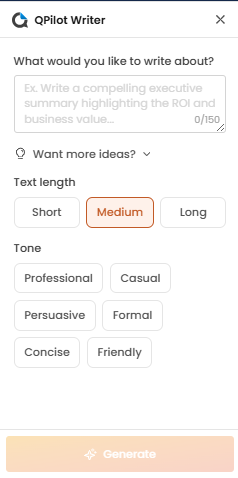
Here you can include a prompt describing what you want to write, text length as well as the tone you want the content to use.
A preview of the text will appear at the bottom of the window:
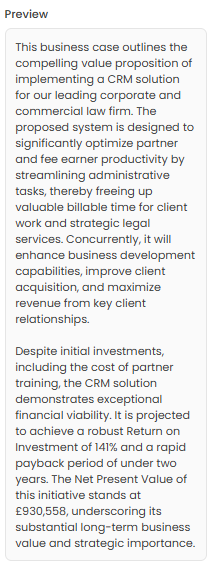
If you're happy with the suggestion, you can select Insert and the text will be added to your session, however if you would like to see another suggestion you can select the Regenerate icon which is next to the Insert button:
.png)
QPilot can be found underneath any empty content box within ValueHub (e.g. benefit notes, case details, executive overview, goals and challenges):

QPilot will then suggest some text based off of the calculation inputs and the rest of the session:
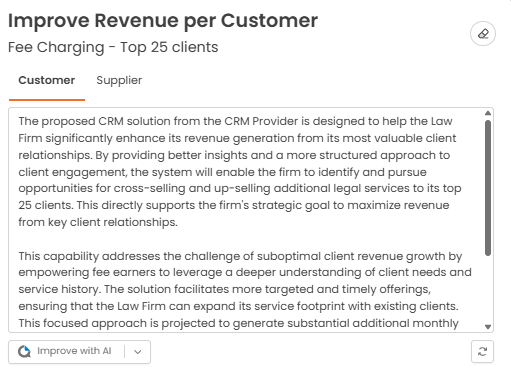
You can keep the text if you're happy with it, or if you want to edit it you can click on the text to make adjustments. Alternatively, if you would like QPilot to suggest something new, click on the Regenerate icon at the bottom right of the screen:

QPilot can be found underneath any content box within ValueHub (e.g. benefit notes, case details, executive overview, goals and challenges):

ValueHub will display a drop-down menu with some options as to how to improve the text (e.g. make shorter, make longer, fix grammer, change tone, improve or write for me):
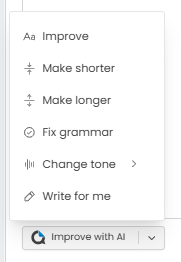
Select which option is more appropriate for your situation.


We need to confirm your email address.
To complete the subscription process, please click the link in the email we just sent you.


